

🧊 Introduction
Caching gets tricky when URLs change constantly (e.g. when query params include timestamps)
We were building a system that used GraphQL to serve real-time data from headless CMS, where URLs changed every day because of a date parameter. That made traditional URL-based cache busting impossible.
So we dropped URL-based caching entirely and built a tag-based, event-driven invalidation system instead. Cache purges happen automatically when content is published, not when the URL changes.
😵💫 The Problem: Unstable URLs Broke Caching
The GraphQL query we used required a date parameter to fetch time-sensitive data:
1query getData($date: Calendar) {2 itemList(3 filter: {4 startAt: { _expressions: [{ value: $date, _operator: AT_OR_BEFORE }] }5 endAt: { _expressions: [{ value: $date, _operator: AT_OR_AFTER }] }6 }7 ) {8 items {9 ... // response fields10 }11 }12}
Because the date changed daily, it produced a new URL every time:
1https://<your-graphql-endpoint>?...&date=2024-09-07T00:00:00Z
This broke caching: Akamai treated each URL as unique, even if the underlying content hadn’t changed.
💡 The Fix: Cache by Tag, Not URL
Instead of relying on URLs, we built a system that:
- Caches GraphQL responses in Akamai with a custom tag
- On publish, sends a cache purge request to Akamai using that tag
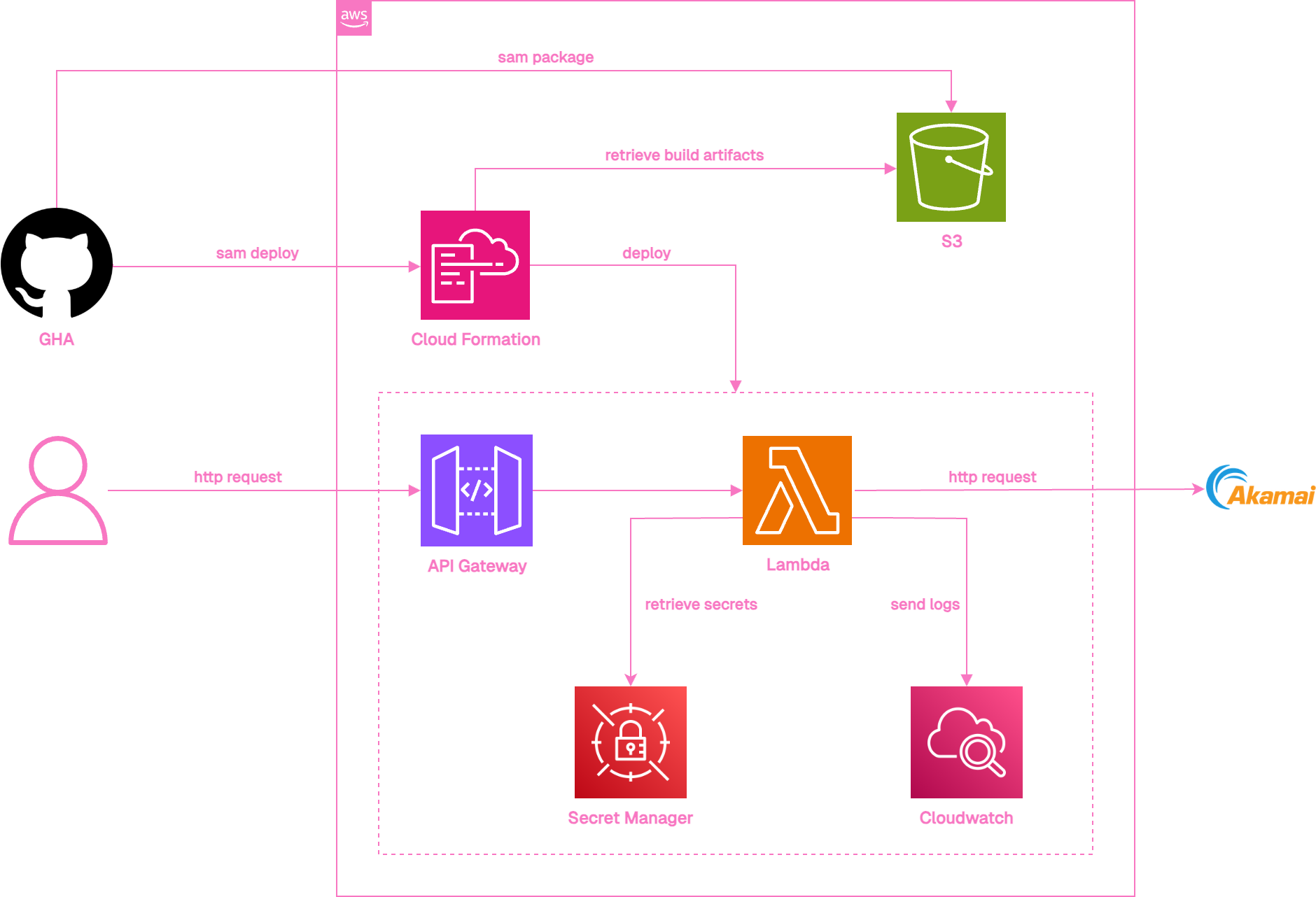
The image below shows the overall architecture:
Triggering Cache Purge from headless CMS
In most headless CMS platforms, it’s possible to set up custom actions that fire when specific events occur, such as publishing content. We configured a trigger to send a request to API Gateway whenever content is updated.
That request includes key metadata (like what content was affected) in the request header. The backend (lambda) extracts this info, builds a cache tag, and uses it to invalidate Akamai cache.
Why Tags?
- URLs were unstable due to date params
- Tags provide a stable, content-based way to track what to purge
- Akamai supports tag-based purging, which is fast and clean
🏷️ Tag & Cache Key Design
🔖 Cache Tags
- Tag value was extracted from the request header
- Sanitized to remove invalid characters (=, ;, spaces, etc.)
🧩 Cache Key Logic
- Excluded date from the cache key so content appears “static”
- Origin requests still included the date param to maintain filtering behavior
- Result: cache is reused across dates until a purge happens
📦 When does the cache purge happen?
On publish:
- User publishes content in headless CMS
- headless CMS fires a custom HTTP request to API Gateway
- Lambda reads the tag from the header and calls Akamai’s purge API
- Akamai clears the matching cache
- Updated content is reflected on the site (usually within 20–30 sec)
🧠 Final Thoughts
- Query param-based URLs make caching hard - this was quite a challenge!
- Tags provide a stable, efficient way to manage cache
- Event-driven purging keeps content fresh without manual intervention
