Intro
Our team frequently received requests to purge Akamai CDN cache. Sometimes these requests came late at night when something urgent needed to go live. The manual process involved logging into the Akamai console, navigating to the right property, and executing the purge. It was tedious and error-prone.
The solution: a Slack bot that lets authorized team members purge cache directly from a private channel.
Why not AWS Chatbot or Bedrock? We already had a Lambda function for other Akamai operations, so adding a new endpoint was the path of least resistance.
Architecture Overview
The system involves four components: Slack, AWS Lambda, Akamai, and the Slack API for responses.
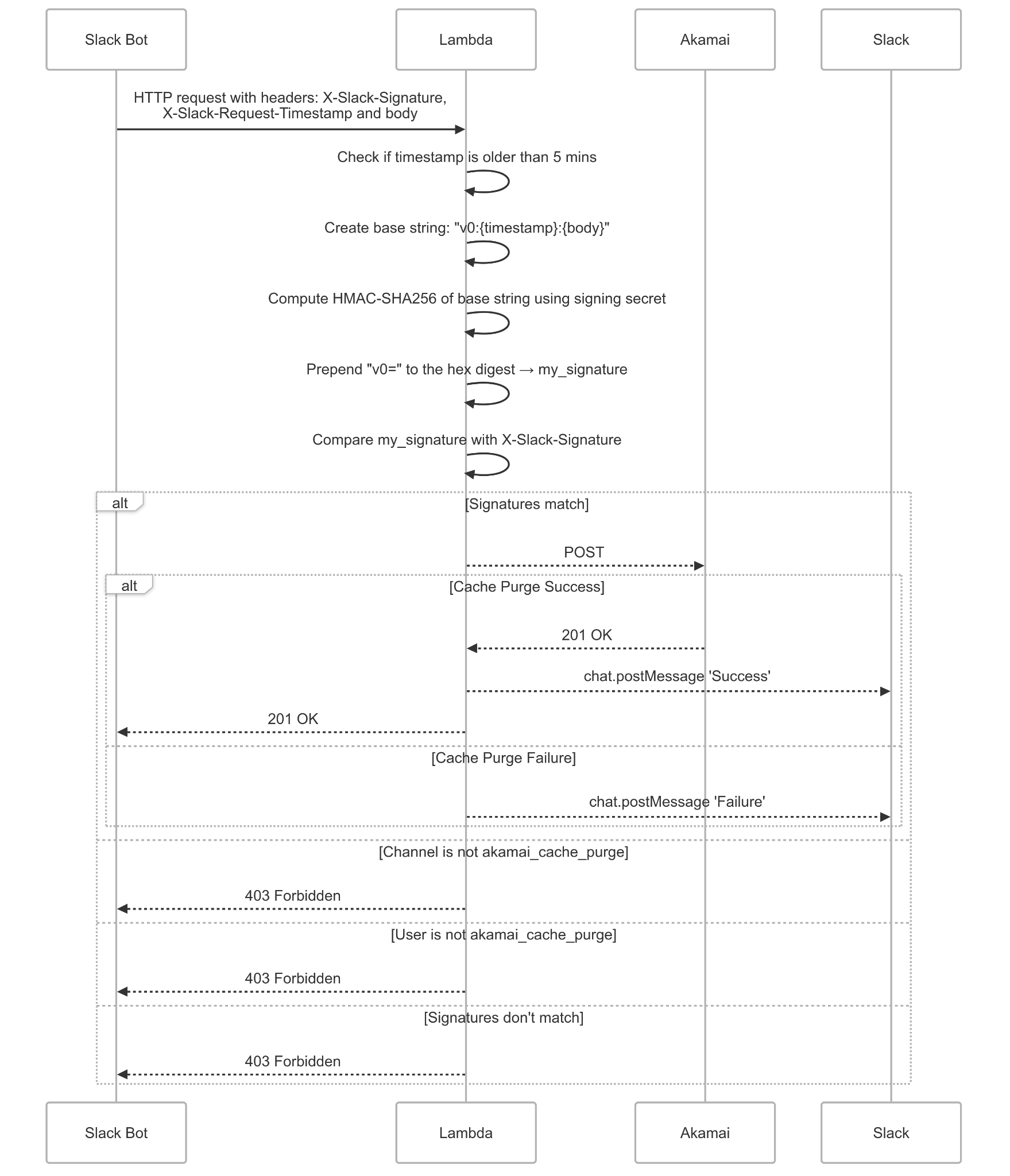
The flow works like this:
- User sends a message in the private Slack channel with cache purge details
- Slack sends an HTTP request to Lambda with signature headers
- Lambda verifies the signature, channel ID, and bot ID
- If valid, Lambda calls Akamai's purge API
- Lambda posts the result back to Slack as a thread reply
Security Considerations
Since cache purging can be expensive (millions of new requests if someone purges everything), security was critical:
- Slack Signature Verification - Verify requests actually come from Slack using HMAC-SHA256
- Channel Restriction - Only accept requests from a specific private channel
- Bot ID Validation - Ensure the request is from our specific bot
- Timestamp Validation - Reject requests older than 5 minutes to prevent replay attacks
- Input Validation - Validate cache type and path format
Slack Request Verification
Slack signs every request with a secret. The verification follows Slack's official docs:
1const crypto = require('crypto')23export const isValidSignature = async (4 event: APIGatewayProxyEvent,5): Promise<boolean> => {6 const headers = event.headers7 const rawBody = event.body89 const body = JSON.parse(rawBody)1011 // Restrict to specific channel and bot12 const botId = body?.event?.bot_id13 const channelId = body?.event?.channel1415 if (botId !== BOT_ID || channelId !== CHANNEL_ID) {16 return false17 }1819 const slackSignature =20 headers['x-slack-signature'] || headers['X-Slack-Signature']21 const slackTimestamp =22 headers['x-slack-request-timestamp'] || headers['X-Slack-Request-Timestamp']2324 if (!slackSignature || !slackTimestamp) {25 return false26 }2728 const secrets = await getSecretsFromSecretManager()29 const SLACK_SIGNING_SECRET = secrets[SECRET_KEYS.slackSigningSecret]3031 // Prevent replay attacks (5 min window)32 const fiveMinutesAgo = Math.floor(Date.now() / 1000) - 60 * 533 if (parseInt(slackTimestamp, 10) < fiveMinutesAgo) {34 return false35 }3637 // Create base string: v0:timestamp:body38 const sigBaseString = `v0:${slackTimestamp}:${rawBody}`3940 // Compute HMAC-SHA25641 const hmac = crypto.createHmac('sha256', SLACK_SIGNING_SECRET)42 hmac.update(sigBaseString, 'utf8')43 const mySignature = `v0=${hmac.digest('hex')}`4445 // Use timing-safe comparison to prevent timing attacks46 const signatureIsValid = crypto.timingSafeEqual(47 Buffer.from(mySignature, 'utf8'),48 Buffer.from(slackSignature, 'utf8'),49 )5051 return !!signatureIsValid52}
The key steps:
- Check channel ID and bot ID first (fast fail)
- Validate timestamp is within 5 minutes
- Construct the signature base string:
v0:{timestamp}:{body} - Compute HMAC-SHA256 with the signing secret
- Use
timingSafeEqualto prevent timing attacks
Lambda Handler
The main handler orchestrates everything:
1import type { APIGatewayProxyEvent, APIGatewayProxyResult } from 'aws-lambda'2const EdgeGrid = require('akamai-edgegrid')34export const lambdaHandler = async (5 event: APIGatewayProxyEvent,6): Promise<APIGatewayProxyResult> => {7 const payload = JSON.parse(event.body)89 // Verify Slack signature10 if (!(await isValidSignature(event))) {11 return {12 statusCode: 403,13 body: JSON.stringify({ message: 'Forbidden' }),14 }15 }1617 // Handle Slack URL verification challenge18 if (payload.type === 'url_verification') {19 return {20 statusCode: 200,21 body: JSON.stringify({ challenge: payload.challenge }),22 }23 }2425 // Parse the message to extract cache type and target path26 // The structure depends on your Slack Workflow form configuration27 const { cacheType, targetPath } = parseSlackMessage(payload)28 const isCacheTag = cacheType === 'tag'2930 // Validate input31 if (!targetPath || cacheType === undefined) {32 return {33 statusCode: 200,34 body: JSON.stringify({ message: 'Invalid Payload' }),35 }36 }3738 // Validate cache tag length (Akamai limit)39 if (isCacheTag && targetPath.length > 128) {40 sendMessageToSlack({41 threadTs: payload.event.ts,42 targetPath,43 message: 'Invalid Cache Tag',44 hasError: true,45 })46 return {47 statusCode: 200,48 body: JSON.stringify({ message: 'Invalid Cache Tag' }),49 }50 }5152 // Create .edgerc file for Akamai authentication53 await createEdgercFile()5455 const response = await getSecretsFromSecretManager()56 const AKAMAI_HOST = response[SECRET_KEYS.akamaiHost]57 const PATH = `https://${AKAMAI_HOST}/ccu/v3/delete/${isCacheTag ? 'tag' : 'url'}/production`5859 const eg = new EdgeGrid({60 path: EDGERC_FILE_PATH,61 section: 'default',62 })6364 return new Promise((resolve, reject) => {65 eg.auth({66 path: PATH,67 method: 'POST',68 headers: { 'content-type': 'application/json' },69 body: JSON.stringify({ objects: [targetPath] }),70 })7172 eg.send((error, response, body) => {73 if (response) {74 sendMessageToSlack({75 threadTs: payload.event.ts,76 targetPath,77 hasError: false,78 })79 resolve({80 statusCode: 200,81 body: JSON.stringify({82 message: `Successfully purged cache with ${targetPath}`,83 }),84 })85 } else {86 sendMessageToSlack({87 threadTs: payload.event.ts,88 targetPath,89 message: 'Error sending request to EdgeGrid',90 hasError: true,91 })92 reject(error || new Error('Unknown error occurred'))93 }94 })95 })96}
Akamai EdgeGrid Authentication
Akamai uses EdgeGrid for API authentication. The akamai-edgegrid npm package handles the signature generation, but it requires a .edgerc config file.
Since Lambda doesn't have persistent storage, we use Lambda's ephemeral storage (/tmp directory) to write the config file. The exact lifespan of ephemeral storage isn't guaranteed. It persists across warm invocations but gets cleared when the execution environment is recycled. To avoid unnecessary writes, we check if the file exists before creating it:
1import fs from 'fs/promises'23const EDGERC_FILE_PATH = '/tmp/.edgerc'45const fileExists = async (path: string): Promise<boolean> => {6 try {7 await fs.access(path)8 return true9 } catch {10 return false11 }12}1314export const createEdgercFile = async (): Promise<void> => {15 // Skip if file already exists (reuse across warm invocations)16 if (await fileExists(EDGERC_FILE_PATH)) {17 return18 }1920 const secrets = await getSecretsFromSecretManager()2122 const edgercContent = `[default]23client_secret = ${secrets.akamai_client_secret}24host = ${secrets.akamai_host}25access_token = ${secrets.akamai_access_token}26client_token = ${secrets.akamai_client_token}`2728 await fs.writeFile(EDGERC_FILE_PATH, edgercContent, 'utf-8')29}
The credentials are stored in AWS Secrets Manager. For Akamai, I created API credentials scoped only to cache purge operations for the specific property, following the principle of least privilege.
The Akamai purge API endpoint format is:
1POST /ccu/v3/delete/{type}/production
Where {type} is either url (for URL-based purge) or tag (for cache tag purge). The request body contains an array of objects to purge:
1{2 "objects": ["https://example.com/path/to/purge"]3}
Sending Results Back to Slack
After purging (or failing), the bot replies in the thread so users know what happened:
1const axios = require('axios')23export const sendMessageToSlack = async ({4 threadTs,5 targetPath,6 message,7 hasError,8}: {9 threadTs: string10 targetPath: string11 message?: string12 hasError: boolean13}): Promise<void> => {14 const secrets = await getSecretsFromSecretManager()15 const SLACK_BOT_TOKEN = secrets[SECRET_KEYS.slackBotToken]1617 await axios.post(18 'https://slack.com/api/chat.postMessage',19 {20 channel: CHANNEL_ID,21 thread_ts: threadTs,22 text: `${hasError ? 'Failed to Purge' : 'Successfully Purged'} ${targetPath}${hasError ? `\nCause: ${message}` : ''}`,23 },24 {25 headers: {26 Authorization: `Bearer ${SLACK_BOT_TOKEN}`,27 'Content-Type': 'application/json',28 },29 },30 )31}
The thread_ts parameter ensures the response appears as a thread reply rather than a new message, keeping the channel clean.
AWS Infrastructure
The Lambda is defined in SAM template:
1AkamaiCachePurgeForSlackFunction:2 Type: AWS::Serverless::Function3 Properties:4 FunctionName: my-akamai-cache-purge-slack-lambda5 Handler: dist/handlers/akamaiCachePurgeForSlackHandler.lambdaHandler6 Runtime: nodejs20.x7 Architectures:8 - x86_649 Events:10 AkamaiCachePurgeApi:11 Type: Api12 Properties:13 RestApiId: !Ref Api14 Path: /akamai-cache-purge-for-slack15 Method: post16 Auth:17 ApiKeyRequired: false18 Role: !Sub arn:aws:iam::${AWS::AccountId}:role/my-lambda-execution-role
Note that ApiKeyRequired: false because authentication is handled by Slack signature verification instead.
Secrets Management
All sensitive values are stored in AWS Secrets Manager:
1import {2 SecretsManagerClient,3 GetSecretValueCommand,4} from '@aws-sdk/client-secrets-manager'56const SECRET_NAME = 'my-project/akamai-cache-purge'78const client = new SecretsManagerClient({ region: 'ap-northeast-1' })910export const getSecretsFromSecretManager = async () => {11 const response = await client.send(12 new GetSecretValueCommand({13 SecretId: SECRET_NAME,14 VersionStage: 'AWSCURRENT',15 }),16 )17 return JSON.parse(response.SecretString)18}
The secret contains:
akamai_client_secret- Akamai API client secretakamai_host- Akamai API hostakamai_access_token- Akamai API access tokenakamai_client_token- Akamai API client tokenslack_signing_secret- For verifying Slack requestsslack_bot_token- For posting messages back to Slack
Slack Workflow Setup
The Slack side uses a Workflow Builder form that captures:
- Executor - Who is requesting the purge (auto-filled)
- Cache Type - Dropdown to select between cache tag or URL purge
- Target Path - The URL or cache tag to purge
The workflow sends a formatted message to the channel, which triggers the bot. This structured input makes parsing reliable and prevents malformed requests.
Retrospective
What Worked Well
- Private channel restriction - Only team members with access can trigger purges
- Thread replies - Results appear in-thread, keeping the channel clean
- Validation - Bad input gets caught early with clear error messages
What I'd Do Differently
In retrospect, I could have used the Slack Bolt package to simplify the authentication flow. Bolt handles signature verification automatically:
1// With Bolt (what I could have done)2import { App } from '@slack/bolt'34const app = new App({5 token: process.env.SLACK_BOT_TOKEN,6 signingSecret: process.env.SLACK_SIGNING_SECRET,7})89app.message('purge', async ({ message, say }) => {10 // Bolt handles all the signature verification11 await purgeCache(message.text)12 await say({ text: 'Cache purged!', thread_ts: message.ts })13})
But I didn't know about Bolt at the time, and the manual implementation taught me a lot about how Slack authentication actually works.
Impact
This automation eliminated:
- Late-night manual cache purges
- The need to share Akamai console access
- Human error in cache purge operations
Team members can now purge cache in seconds from Slack, with full audit trail (Slack message history) and access control (private channel membership)